Need additional development or test resources for your embedded project? We have a team
of experienced embedded engineers who can accelerate your time to market and make your project a success.
|
|
|
UMS (Mobiuz)(Uzbekistan) – Set the APN to ‘net.ums.uz’
UMS (Mobiuz) provides cellular network services on LTE, HSDPA, UMTS, EDGE, GPRS, GSM technologies.
To set the APN for network provider UMS (Mobiuz) in Uzbekistan,
- The Access Point Network (APN) for UMS (Mobiuz) is 'net.ums.uz'.
- Use the AT+CGDCONT AT command to set the APN for UMS (Mobiuz).
- Connect mobile device to the AT Command Tester tool.
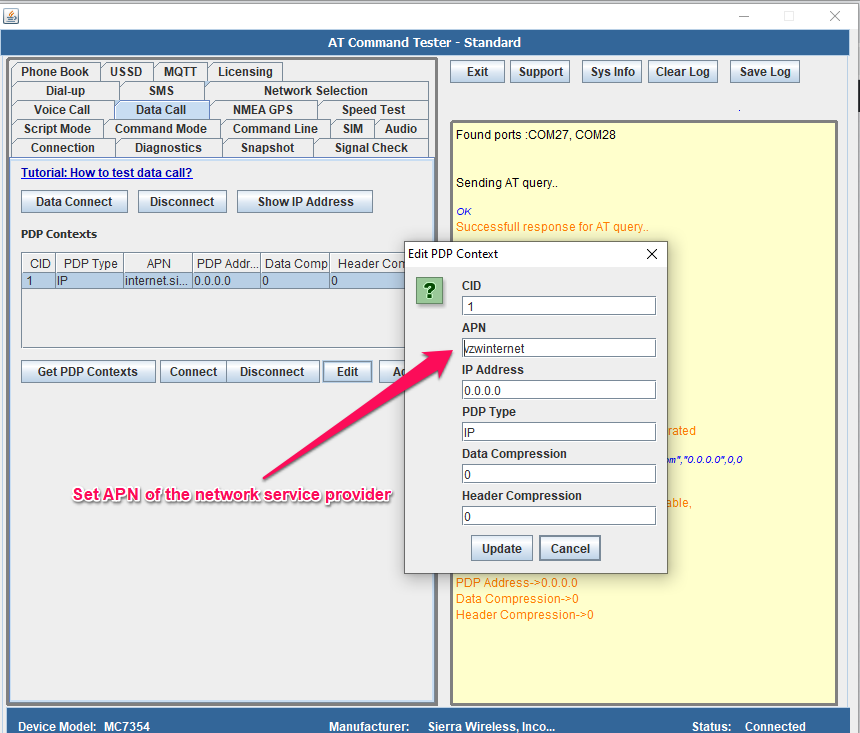
- Select a PDP profile in the device and set the APN by sending the below AT Command to the mobile device,
- See an example of setting APN on the mobile devices using the AT Command Tester tool.,
AT+CGDCONT= 1,"IP","net.ums.uz","0.0.0.0",0,0